
Export to the browser (Web)
Web export creates a folder that runs the game inside the browser (Chrome, Edge, Firefox and phone browsers), using WebGL 2 and WebAssembly. The player opens a link, clicks Play, and that’s it: nothing to install.
1. Open the panel
Section titled “1. Open the panel”Properties > Export Game > Web. The panel starts collapsed; click its title to open it.
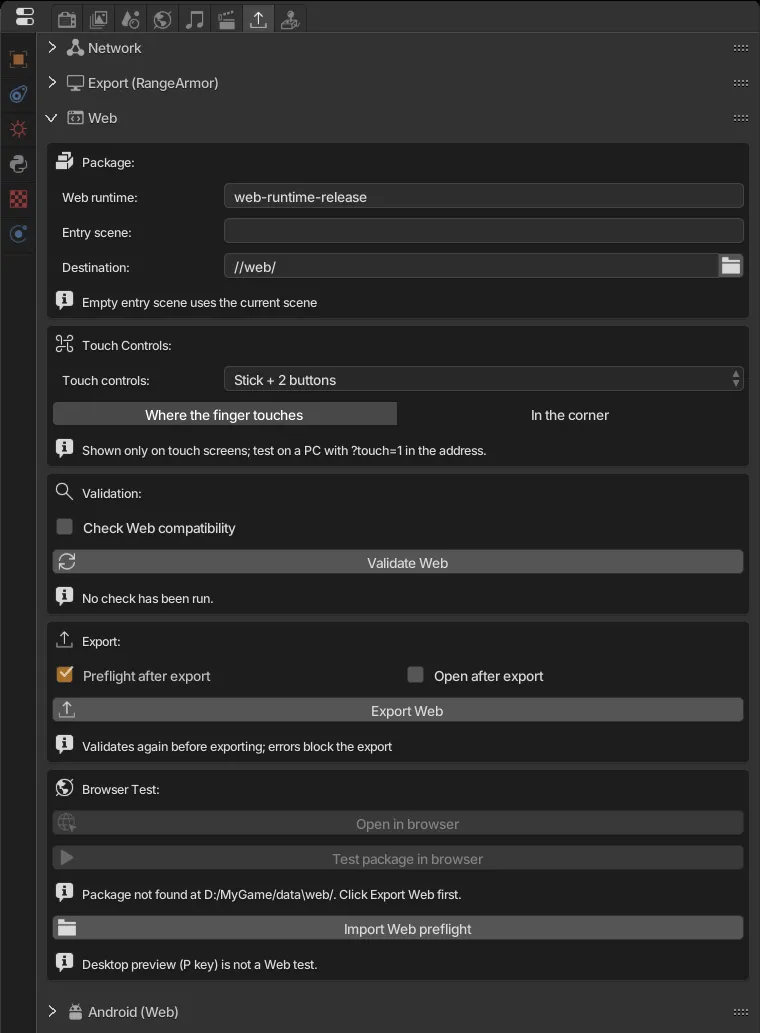
2. Package
Section titled “2. Package”| Field | What it does |
|---|---|
| Web runtime | Which runtime to use. Keep web-runtime-release. |
| Entry scene | First scene of the game. Empty uses the current scene. |
| Destination | Output folder. The default //web/ creates a web folder next to the .range. |
3. Touch Controls
Section titled “3. Touch Controls”Phones and tablets have no keyboard. Here you pick the virtual controller shown only on touch screens. It also applies to Android.
| Layout | For games that read… |
|---|---|
| Stick + 2 buttons | Gamepad: left stick and A/B buttons |
| D-pad + 4 buttons | Gamepad: d-pad and A/B/X/Y |
| Two sticks | Gamepad: two sticks |
| Stick as WASD + Space | Keyboard: the stick presses W/A/S/D and the button presses Space |
| D-pad as arrows + Space/Enter | Keyboard: arrows, Space and Enter |
| First person (WASD + look) | Keyboard and mouse: move with WASD, look around with the right stick |
| Racing (steer + pedals) | Gamepad: steering on the stick, pedals on the triggers; the player can switch to arrows or tilting the device |
| None | No controls; taps become mouse clicks |
Stick mode chooses whether the stick appears where the finger touches (Where the finger touches) or stays fixed in the corner (In the corner).
To see the controls on a PC, open the game with ?touch=1 at the end of the address and use the mouse as your finger.
4. Validate
Section titled “4. Validate”Click Validate Web. The engine checks scenes, logic bricks, scripts and files and lists the problems:
- Error (✖ icon): blocks the export. Must be fixed.
- Warning (⚠ icon): exports, but something may not work in the browser.
- Info: information only.
Many items have a Locate button that selects the problem object. After fixing, validate again.
5. Export
Section titled “5. Export”- Save the file (
Ctrl+S). - Options:
- Preflight after export: after exporting, opens the package in a hidden Chrome/Edge for about 15 s and adds the errors the browser saw to the report. Leave it on.
- Open after export: opens the game in the browser when done.
- Click Export Web.
Export validates again before building. If it fails, the previous package is kept.
6. Test in the browser
Section titled “6. Test in the browser”You can’t just double-click index.html: browsers block WebAssembly loaded from local files. Use the engine’s server:
- Browser Test > Open in browser: starts a local server and opens the game. Click Play on the page.
- Stop server shuts the server down (it also closes with the engine).
Tip: ?debug=1 at the end of the address shows the runtime log on the page.
7. Publish
Section titled “7. Publish”The destination folder is a ready website (index.html, RangeRuntime.*, game/, manifest.json…). It includes a HOSTING.md with recipes for each service.
- itch.io: zip the contents of the folder (
index.htmlmust be at the root of the zip), create an HTML project and check This file will be played in the browser. - GitHub Pages, Netlify, your own server: upload the whole folder.
Server requirements:
- Serve
.wasmasapplication/wasm. - Enable gzip or brotli compression: the download drops from ~46 MB to ~17 MB.
- COOP/COEP headers are not needed.
When you publish a new version, change the package version so browsers don’t use the old cached one.
Good to know
Section titled “Good to know”- Sound only starts after the player clicks Play (a browser rule). Formats: WAV, MP3 and OGG. OpenAL sound effects don’t exist on Web.
- Saves (
saveGlobalDict) are stored in the browser, per site. Changing domain or clearing site data erases the save. - The page has a Fullscreen button. On Android it tries to lock landscape; on iPhone the button is hidden (Safari doesn’t allow it).
- Minimum graphics: WebGL 2.