
First script
- Select an object in the scene and add an Always sensor (with True Level Triggering on) connected to a Python controller.
- Create a text called
mover.pyin the text editor and pick it in the controller. - Paste the code and press P to play.
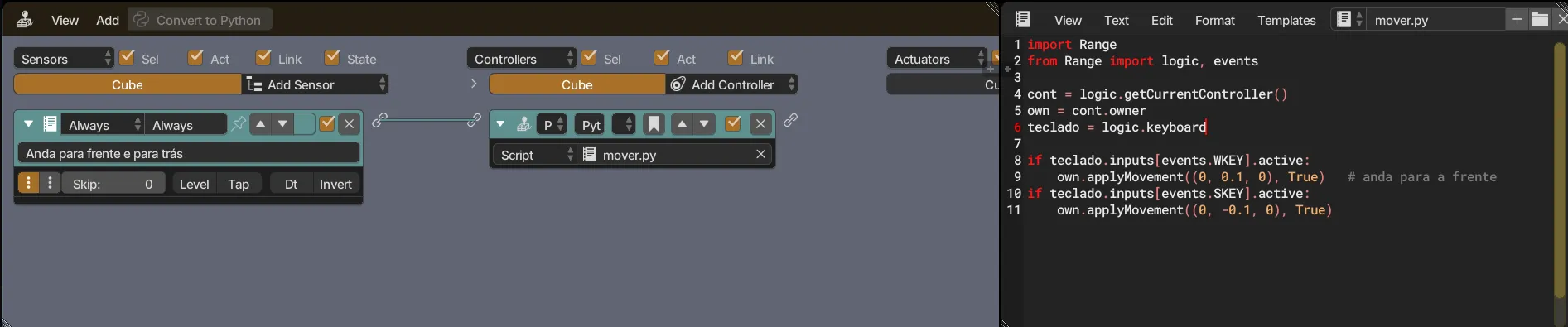
import Rangefrom Range import logic, events
cont = logic.getCurrentController()own = cont.ownerteclado = logic.keyboard
if teclado.inputs[events.WKEY].active:    own.applyMovement((0, 0.1, 0), True)   # anda para a frenteif teclado.inputs[events.SKEY].active:    own.applyMovement((0, -0.1, 0), True)
The code uses Portuguese names, the same ones shown in the screenshots: mover = move, teclado = keyboard, Velocidade = speed.
logic.getCurrentController()returns the controller running the script.ownis the object that owns the controller, aKX_GameObject.applyMovement(vector, local)moves the object;Trueuses the object’s own axes.
The same with a component
Section titled “The same with a component”A component does the same job without logic bricks. It is a Python class attached to the object, and you can change its parameters in the panel without touching the code.
- Create a text called
mover_componente.pyin the text editor (the name must end in.py) and paste the code below. - Select the object and open the components tab (Python icon) in the properties. In Existing Components, choose In .Range File under Modules, then the Mover class under Classes, and click Register. If the class doesn’t show up, click the refresh button in the panel corner.
- The component shows up in Object’s Components, with the Velocidade field. Adjust it if you want and press P to play.
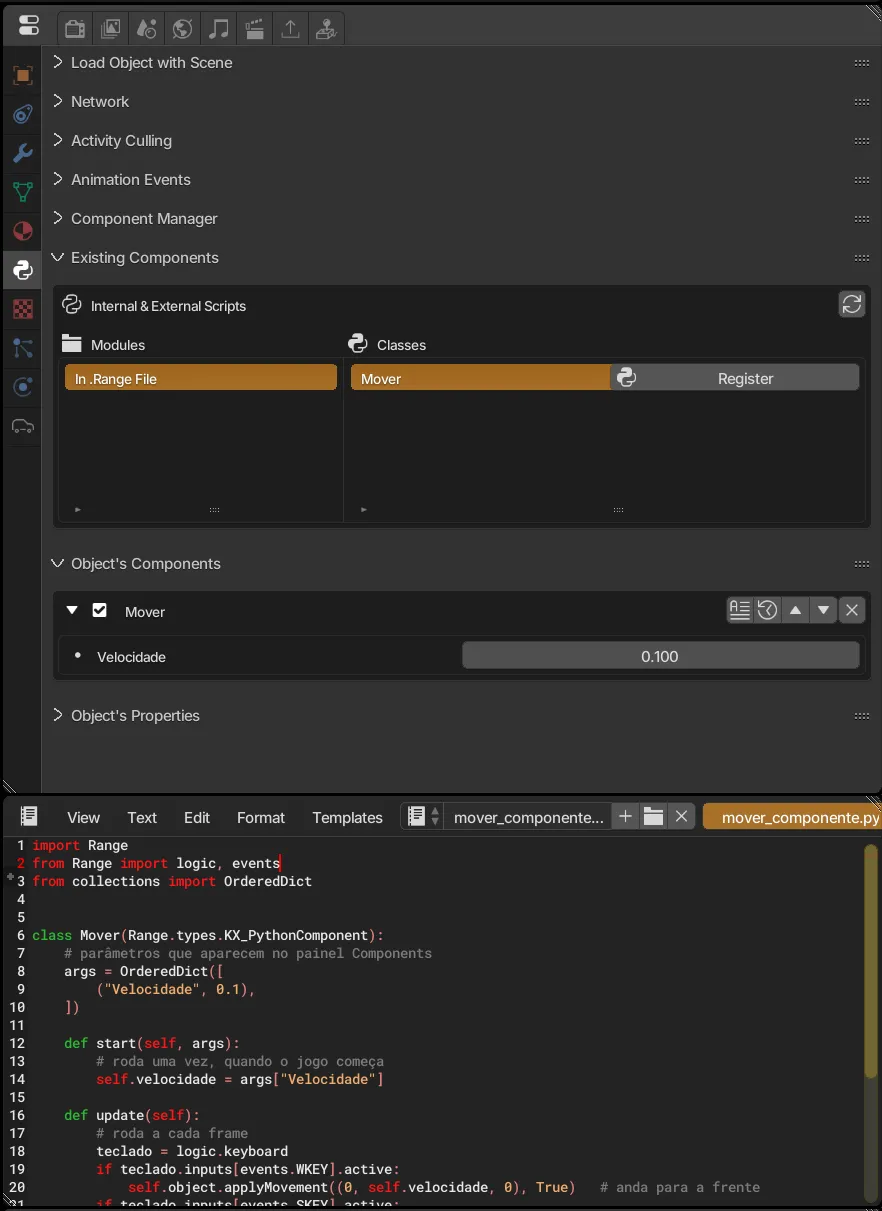
import Rangefrom Range import logic, eventsfrom collections import OrderedDict

class Mover(Range.types.KX_PythonComponent):    # parâmetros que aparecem no painel Components    args = OrderedDict([        ("Velocidade", 0.1),    ])
    def start(self, args):        # roda uma vez, quando o jogo começa        self.velocidade = args["Velocidade"]
def update(self): # roda a cada frame teclado = logic.keyboard if teclado.inputs[events.WKEY].active: self.object.applyMovement((0, self.velocidade, 0), True) # anda para a frente if teclado.inputs[events.SKEY].active: self.object.applyMovement((0, -self.velocidade, 0), True)- The class inherits from
KX_PythonComponent. argsdefines the panel parameters. TheOrderedDictorder is the order they show up in.start(args)receives the panel values;update()runs every frame, before the logic bricks.self.objectis the object that owns the component, instead of the script’scont.owner.
Script or component? Use a script with logic bricks to connect sensors and actuators visually. Use a component when the logic is all Python and you want to reuse the same class on several objects, each with its own values.